




Close Menu
West TimelinesWest Timelines
  • News
  • Politics
  • World
    • Africa
    • Asia
    • Australia
    • Europe
      • United Kingdom
      • Germany
      • France
      • Italy
      • Russia
      • Spain
      • Turkey
      • Ukraine
    • North America
      • United States
      • Canada
    • South America
  • Business
    • Finance
    • Markets
    • Investing
    • Small Business
    • Crypto
  • Elections
  • Entertainment
  • Health
  • Lifestyle
    • Fashion
    • Food & Drink
    • Travel
    • Astrology
  • Weird News
  • Science
  • Sports
    • Soccer
  • Technology
  • Viral Trends
Trending Now

Dubai Spotlight: Analyzing the Evolving Audience Tastes with AI Social Listening Tools in the UAE

3 weeks ago

مرآة التاريخ: تحليل البناء السردي للدروس الخالدة في قصص الأنبياء والإسلام

4 weeks ago

السندات الحكومية والشركات: أساسيات الاستثمار الآمن والدخل الثابت

1 month ago

UAE Ranks Among Top Rugby Markets on TOD as British & Irish Lions Tour Kicks Off

5 months ago

Darven: A New Leap in AI-Powered Legal Technology Launching from the UAE to the World

5 months ago
Facebook X (Twitter) Instagram
West TimelinesWest Timelines
  • News
  • US
  • #Elections
  • World
    • North America
      • United States
      • Canada
    • Europe
      • United Kingdom
      • Germany
      • France
      • Italy
      • Spain
      • Ukraine
      • Russia
      • Turkey
    • Asia
    • Australia
    • Africa
    • South America
  • Politics
  • Business
    • Finance
    • Investing
    • Markets
    • Small Business
    • Crypto
  • Lifestyle
    • Astrology
    • Fashion
    • Food & Drink
    • Travel
  • Health
  • Sports
    • Soccer
  • More
    • Entertainment
    • Technology
    • Science
    • Viral Trends
    • Weird News
Subscribe
  • Israel War
  • Ukraine War
  • United Kingdom
  • Canada
  • Germany
  • France
  • Italy
  • Russia
  • Spain
  • Turkey
  • Ukraine
West TimelinesWest Timelines
Home»Technology
Technology

Make Sure to Back Up Your iPhone Correctly Before Installing iOS 18

September 14, 2024No Comments2 Mins Read
Facebook Twitter Pinterest LinkedIn Telegram Email WhatsApp Copy Link

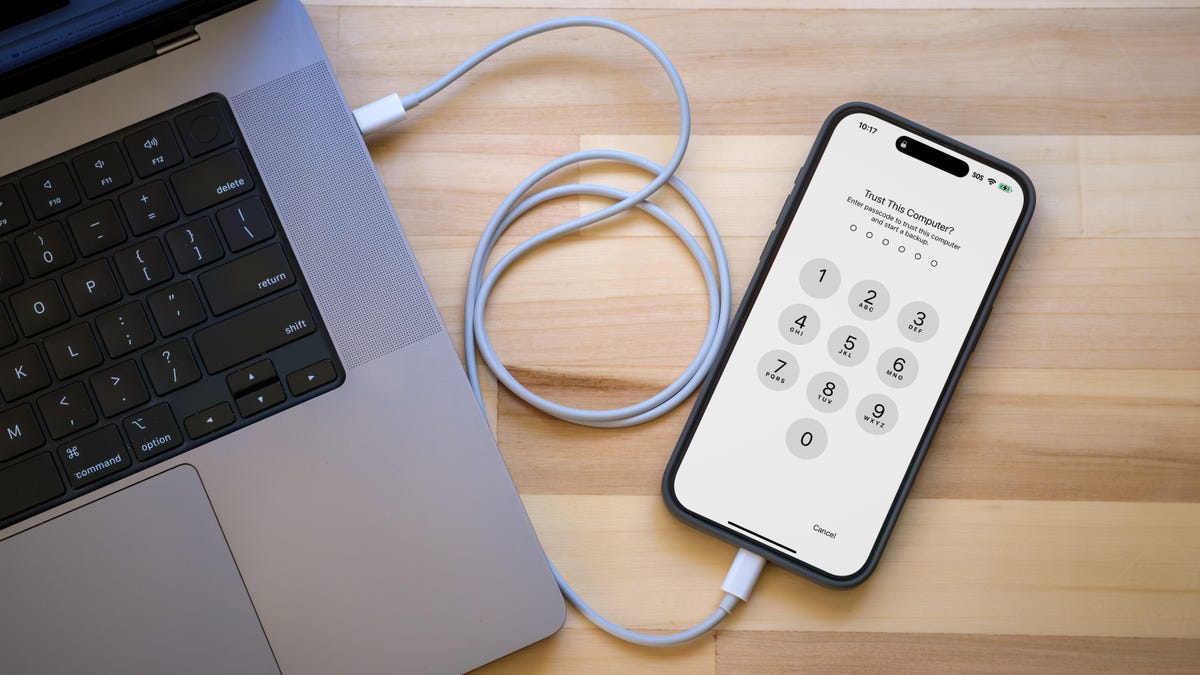
If you own an iPhone, you will soon be able to install the latest version of iOS 18, which was announced alongside the new iPhone 16 and iPhone 16 Pro models at Apple’s September event. To prepare for this update, it is important to back up your data in a specific way that will make it easier to revert back to iOS 17 if needed. While iCloud Backup is a convenient way to protect your data, it is not ideal for moving between different iOS versions. In order to create a backup that can be used to restore iOS 17, you need to create an archived backup on your computer.

Creating an archived backup on your computer involves encrypting the data for security purposes and setting a password for access. This ensures that sensitive information is protected in the backup, but it is important to remember the password in case it is needed to access the backup in the future. The process of creating an archived backup on a Mac involves connecting your iPhone, opening Finder, selecting your iPhone, encrypting the data if desired, backing up the device, managing backups, and archiving the backup to protect it from being overwritten or deleted.

For Windows users, the iTunes app is still used to create an archived backup of an iPhone. The process is similar to Mac, involving connecting the iPhone to the computer, opening iTunes, selecting the iPhone, encrypting the data, backing up the device, managing backups, and archiving the backup to ensure it is not overwritten or deleted. With an archived backup in place, you can confidently update to iOS 18 knowing that you have a secure backup that can be used to restore your device to iOS 17 if necessary.

iOS warns users if they try to restore from an iCloud backup made under a beta version of the operating system. This highlights the importance of creating an archived backup on your computer before installing a new iOS version. By taking the extra step to archive your backup, you can ensure that your data is protected and can be easily retrieved if needed. Whether you are upgrading to iOS 18 or installing a beta version, having an archived backup is essential for peace of mind and the ability to quickly revert back to a previous iOS version.


Follow on Google News Follow on Flipboard
Share. Facebook Twitter Pinterest Email Telegram WhatsApp Copy Link

You Might Like

Dubai Spotlight: Analyzing the Evolving Audience Tastes with AI Social Listening Tools in the UAE

Darven: A New Leap in AI-Powered Legal Technology Launching from the UAE to the World

Array

Array

Array

Array

Editors Picks

مرآة التاريخ: تحليل البناء السردي للدروس الخالدة في قصص الأنبياء والإسلام

4 weeks ago

السندات الحكومية والشركات: أساسيات الاستثمار الآمن والدخل الثابت

1 month ago

UAE Ranks Among Top Rugby Markets on TOD as British & Irish Lions Tour Kicks Off

5 months ago

Darven: A New Leap in AI-Powered Legal Technology Launching from the UAE to the World

5 months ago

Jordan to Host Iraq in the Final Round of the Asian World Cup Qualifiers After Securing Historic Spot

6 months ago

Latest News

فلسطين: قلبٌ ينبض بالصمود والأمل

7 months ago

Roland Garros 2025: A New Era of Viewing, A Tribute to Legends, and Moments to Remember

7 months ago

Array

7 months ago
Advertisement
Facebook X (Twitter) TikTok Instagram Threads
© 2025 West Timelines. All Rights Reserved. Developed By: Sawah Solutions
  • Privacy Policy
  • Terms
  • Contact

Type above and press Enter to search. Press Esc to cancel.