




Close Menu
West TimelinesWest Timelines
  • News
  • Politics
  • World
    • Africa
    • Asia
    • Australia
    • Europe
      • United Kingdom
      • Germany
      • France
      • Italy
      • Russia
      • Spain
      • Turkey
      • Ukraine
    • North America
      • United States
      • Canada
    • South America
  • Business
    • Finance
    • Markets
    • Investing
    • Small Business
    • Crypto
  • Elections
  • Entertainment
  • Health
  • Lifestyle
    • Fashion
    • Food & Drink
    • Travel
    • Astrology
  • Weird News
  • Science
  • Sports
    • Soccer
  • Technology
  • Viral Trends
Trending Now

RING LAUNCHES NEW AI-POWERED SMART VIDEO SEARCH IN THE UAE

4 weeks ago

Dubai Spotlight: Analyzing the Evolving Audience Tastes with AI Social Listening Tools in the UAE

2 months ago

مرآة التاريخ: تحليل البناء السردي للدروس الخالدة في قصص الأنبياء والإسلام

2 months ago

السندات الحكومية والشركات: أساسيات الاستثمار الآمن والدخل الثابت

2 months ago

UAE Ranks Among Top Rugby Markets on TOD as British & Irish Lions Tour Kicks Off

7 months ago
Facebook X (Twitter) Instagram
West TimelinesWest Timelines
  • News
  • US
  • #Elections
  • World
    • North America
      • United States
      • Canada
    • Europe
      • United Kingdom
      • Germany
      • France
      • Italy
      • Spain
      • Ukraine
      • Russia
      • Turkey
    • Asia
    • Australia
    • Africa
    • South America
  • Politics
  • Business
    • Finance
    • Investing
    • Markets
    • Small Business
    • Crypto
  • Lifestyle
    • Astrology
    • Fashion
    • Food & Drink
    • Travel
  • Health
  • Sports
    • Soccer
  • More
    • Entertainment
    • Technology
    • Science
    • Viral Trends
    • Weird News
Subscribe
  • Israel War
  • Ukraine War
  • United Kingdom
  • Canada
  • Germany
  • France
  • Italy
  • Russia
  • Spain
  • Turkey
  • Ukraine
West TimelinesWest Timelines
Home»Technology
Technology

Google’s Search Circle now available on iPhone, but with some limitations.

May 8, 2024No Comments3 Mins Read
Facebook Twitter Pinterest LinkedIn Telegram Email WhatsApp Copy Link

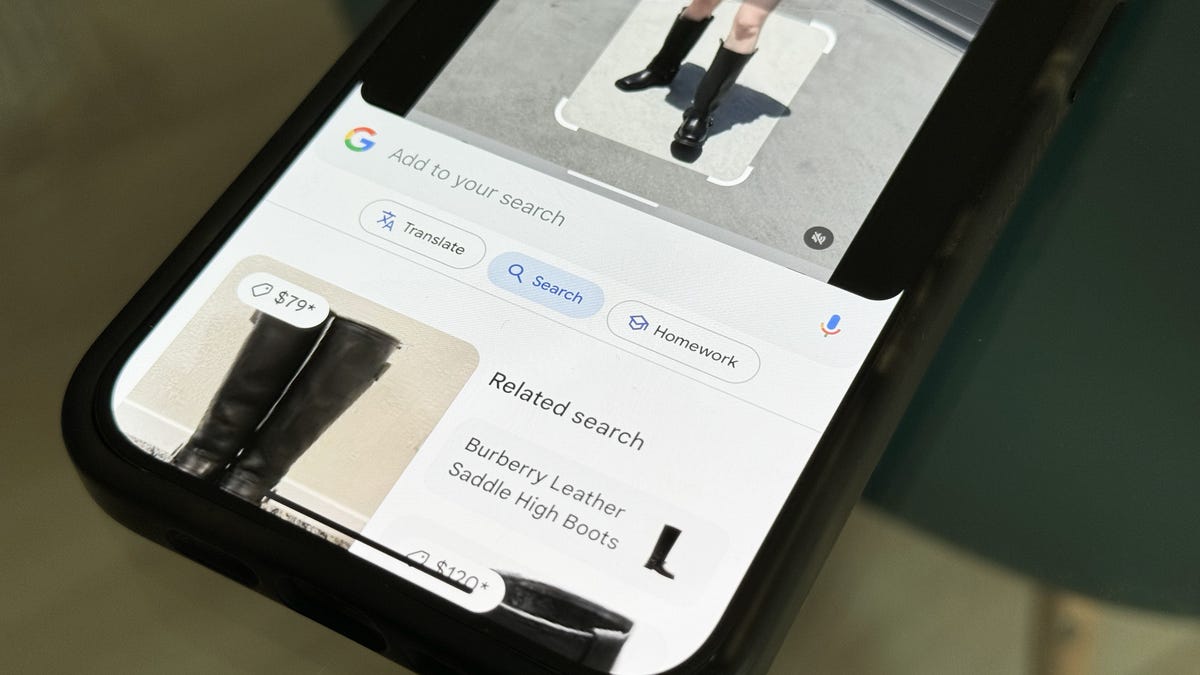
Google introduced Circle to Search earlier this year, a feature available on the Pixel 8 and Galaxy S24 series that allows users to circle, highlight, or tap objects on their Android display and search for them on Google. This feature is exclusive to Android, but there is a workaround for iPhone users. By creating a shortcut using the Google app, iPhone users can take a screenshot and trigger Google Lens’ visual search feature to search for the highlighted object, similar to how Circle to Search works.

The process of creating the Circle to Search alternative on an iPhone involves downloading the Google app and creating a shortcut using the Shortcuts app. This shortcut takes a screenshot of the iPhone display and runs Google Lens’ visual search feature. iPhone users with the iPhone 15 Pro and 15 Pro Max can use the Action button to trigger the shortcut, while users with older models can utilize the Back Tap feature. The shortcut sends the screenshot to the Google app, which then provides Google search results based on the highlighted object.

Although the workaround for using a feature similar to Circle to Search on an iPhone is not as seamless as the original feature on Android, it provides a way for iPhone users to quickly search for objects using visual search. This workaround is faster than manually uploading a photo to the Google app and running it through the visual search feature. Additionally, Siri can be used to run the shortcut by voice command, making it more convenient for iPhone users. Overall, this workaround offers iPhone users a way to access a similar search feature to Circle to Search on their devices.

The Circle to Search alternative on an iPhone allows users to quickly search for objects by taking a screenshot and using Google Lens’ visual search feature. This eliminates the need to manually upload photos to the Google app for searching purposes. The shortcut created on iPhone provides users with Google search results based on the highlighted object, making it convenient and efficient for users who want to identify objects or search for products using visual search technology.

In conclusion, Google’s introduction of Circle to Search on Android devices prompted the development of a workaround for iPhone users to access a similar search feature. By creating a shortcut using the Google app, iPhone users can trigger Google Lens’ visual search feature to search for highlighted objects on their device. This workaround offers iPhone users a fast and efficient way to search for objects using visual search technology, providing a convenient alternative to the original feature on Android devices.


Follow on Google News Follow on Flipboard
Share. Facebook Twitter Pinterest Email Telegram WhatsApp Copy Link

You Might Like

Dubai Spotlight: Analyzing the Evolving Audience Tastes with AI Social Listening Tools in the UAE

Darven: A New Leap in AI-Powered Legal Technology Launching from the UAE to the World

Array

Array

Array

Array

Editors Picks

Dubai Spotlight: Analyzing the Evolving Audience Tastes with AI Social Listening Tools in the UAE

2 months ago

مرآة التاريخ: تحليل البناء السردي للدروس الخالدة في قصص الأنبياء والإسلام

2 months ago

السندات الحكومية والشركات: أساسيات الاستثمار الآمن والدخل الثابت

2 months ago

UAE Ranks Among Top Rugby Markets on TOD as British & Irish Lions Tour Kicks Off

7 months ago

Darven: A New Leap in AI-Powered Legal Technology Launching from the UAE to the World

7 months ago

Latest News

Jordan to Host Iraq in the Final Round of the Asian World Cup Qualifiers After Securing Historic Spot

7 months ago

فلسطين: قلبٌ ينبض بالصمود والأمل

8 months ago

Roland Garros 2025: A New Era of Viewing, A Tribute to Legends, and Moments to Remember

8 months ago
Advertisement
Facebook X (Twitter) TikTok Instagram Threads
© 2026 West Timelines. All Rights Reserved. Developed By: Sawah Solutions
  • Privacy Policy
  • Terms
  • Contact

Type above and press Enter to search. Press Esc to cancel.