




Close Menu
West TimelinesWest Timelines
  • News
  • Politics
  • World
    • Africa
    • Asia
    • Australia
    • Europe
      • United Kingdom
      • Germany
      • France
      • Italy
      • Russia
      • Spain
      • Turkey
      • Ukraine
    • North America
      • United States
      • Canada
    • South America
  • Business
    • Finance
    • Markets
    • Investing
    • Small Business
    • Crypto
  • Elections
  • Entertainment
  • Health
  • Lifestyle
    • Fashion
    • Food & Drink
    • Travel
    • Astrology
  • Weird News
  • Science
  • Sports
    • Soccer
  • Technology
  • Viral Trends
Trending Now

RING LAUNCHES NEW AI-POWERED SMART VIDEO SEARCH IN THE UAE

4 weeks ago

Dubai Spotlight: Analyzing the Evolving Audience Tastes with AI Social Listening Tools in the UAE

2 months ago

مرآة التاريخ: تحليل البناء السردي للدروس الخالدة في قصص الأنبياء والإسلام

2 months ago

السندات الحكومية والشركات: أساسيات الاستثمار الآمن والدخل الثابت

2 months ago

UAE Ranks Among Top Rugby Markets on TOD as British & Irish Lions Tour Kicks Off

7 months ago
Facebook X (Twitter) Instagram
West TimelinesWest Timelines
  • News
  • US
  • #Elections
  • World
    • North America
      • United States
      • Canada
    • Europe
      • United Kingdom
      • Germany
      • France
      • Italy
      • Spain
      • Ukraine
      • Russia
      • Turkey
    • Asia
    • Australia
    • Africa
    • South America
  • Politics
  • Business
    • Finance
    • Investing
    • Markets
    • Small Business
    • Crypto
  • Lifestyle
    • Astrology
    • Fashion
    • Food & Drink
    • Travel
  • Health
  • Sports
    • Soccer
  • More
    • Entertainment
    • Technology
    • Science
    • Viral Trends
    • Weird News
Subscribe
  • Israel War
  • Ukraine War
  • United Kingdom
  • Canada
  • Germany
  • France
  • Italy
  • Russia
  • Spain
  • Turkey
  • Ukraine
West TimelinesWest Timelines
Home»Technology
Technology

Capturing a Screenshot on Any iPhone or Android Device

May 10, 2024No Comments3 Mins Read
Facebook Twitter Pinterest LinkedIn Telegram Email WhatsApp Copy Link

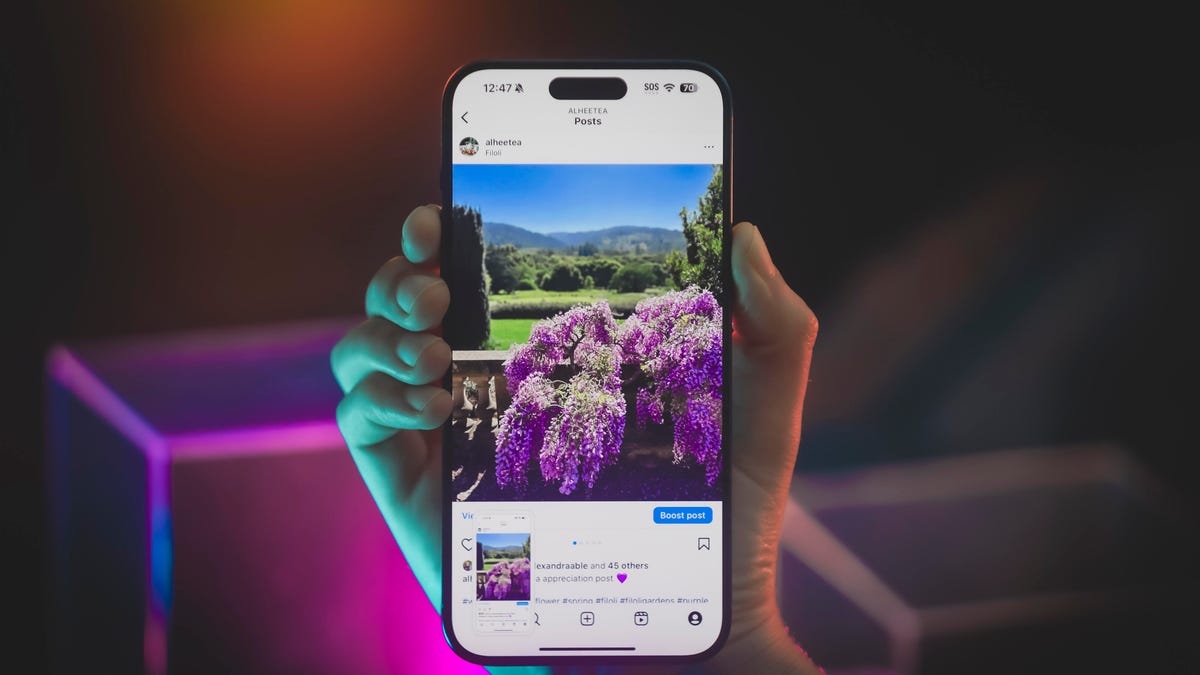
Taking screenshots on your phone can be useful for a variety of reasons, such as saving posts on social media, documenting fashion inspiration, or archiving meaningful conversations. On iPhones without a home button, like the iPhone X and newer models, you can press the power button and volume up button simultaneously to capture a screenshot. For iPhones with a home button, such as the iPhone 8 and earlier, you can press the home button and sleep/wake button together to take a screenshot. After taking a screenshot on an iPhone, you can edit it or share it directly from the mini version that appears on the screen.

Android phones offer different methods for taking screenshots. The most common way is to hold down the power button and volume down button simultaneously, which works on devices like the latest Pixel and Samsung Galaxy phones. Some Motorola phones, like the Motorola Edge Plus or Moto G Power 5G, also offer a unique three-finger touch method for taking screenshots, which can be enabled in the Moto app or Moto Actions menu. Samsung phones have innovative screenshot techniques, such as the karate chop gesture using the edge of your hand or the precision capture feature using the Edge panel. These methods provide options beyond the traditional power and volume button combination for capturing screenshots.

iOS devices also offer the ability to take scrolling screenshots, allowing you to capture multiple pages in a single snapshot. This feature can be useful for saving long articles or social media posts that extend beyond a single screen. Android phones have various ways to capture screenshots, including editing options that may pop up after taking a screenshot. Screenshots on Android are typically saved in the Google Photos app or the device’s native gallery app. Users can choose methods that work best for them based on their phone model and preferences.

In addition to the traditional power and volume button combination, Android phones like Motorola offer the three-finger touch method for taking screenshots. This alternative method provides a unique and convenient way to capture your screen with a simple gesture. Samsung phones have additional screenshot features like the palm swipe gesture and the Edge panel for precise captures. By exploring different methods for taking screenshots on your phone, you can find the one that suits your needs and preferences. Whether you prefer the classic button press or innovative gestures, there are multiple ways to capture and save important content on your device efficiently.


Follow on Google News Follow on Flipboard
Share. Facebook Twitter Pinterest Email Telegram WhatsApp Copy Link

You Might Like

Dubai Spotlight: Analyzing the Evolving Audience Tastes with AI Social Listening Tools in the UAE

Darven: A New Leap in AI-Powered Legal Technology Launching from the UAE to the World

Array

Array

Array

Array

Editors Picks

Dubai Spotlight: Analyzing the Evolving Audience Tastes with AI Social Listening Tools in the UAE

2 months ago

مرآة التاريخ: تحليل البناء السردي للدروس الخالدة في قصص الأنبياء والإسلام

2 months ago

السندات الحكومية والشركات: أساسيات الاستثمار الآمن والدخل الثابت

2 months ago

UAE Ranks Among Top Rugby Markets on TOD as British & Irish Lions Tour Kicks Off

7 months ago

Darven: A New Leap in AI-Powered Legal Technology Launching from the UAE to the World

7 months ago

Latest News

Jordan to Host Iraq in the Final Round of the Asian World Cup Qualifiers After Securing Historic Spot

7 months ago

فلسطين: قلبٌ ينبض بالصمود والأمل

8 months ago

Roland Garros 2025: A New Era of Viewing, A Tribute to Legends, and Moments to Remember

8 months ago
Advertisement
Facebook X (Twitter) TikTok Instagram Threads
© 2026 West Timelines. All Rights Reserved. Developed By: Sawah Solutions
  • Privacy Policy
  • Terms
  • Contact

Type above and press Enter to search. Press Esc to cancel.