



Close Menu
West TimelinesWest Timelines
  • News
  • Politics
  • World
    • Africa
    • Asia
    • Australia
    • Europe
      • United Kingdom
      • Germany
      • France
      • Italy
      • Russia
      • Spain
      • Turkey
      • Ukraine
    • North America
      • United States
      • Canada
    • South America
  • Business
    • Finance
    • Markets
    • Investing
    • Small Business
    • Crypto
  • Elections
  • Entertainment
  • Health
  • Lifestyle
    • Fashion
    • Food & Drink
    • Travel
    • Astrology
  • Weird News
  • Science
  • Sports
    • Soccer
  • Technology
  • Viral Trends
Trending Now

Dubai Spotlight: Analyzing the Evolving Audience Tastes with AI Social Listening Tools in the UAE

4 weeks ago

مرآة التاريخ: تحليل البناء السردي للدروس الخالدة في قصص الأنبياء والإسلام

4 weeks ago

السندات الحكومية والشركات: أساسيات الاستثمار الآمن والدخل الثابت

1 month ago

UAE Ranks Among Top Rugby Markets on TOD as British & Irish Lions Tour Kicks Off

5 months ago

Darven: A New Leap in AI-Powered Legal Technology Launching from the UAE to the World

6 months ago
Facebook X (Twitter) Instagram
West TimelinesWest Timelines
  • News
  • US
  • #Elections
  • World
    • North America
      • United States
      • Canada
    • Europe
      • United Kingdom
      • Germany
      • France
      • Italy
      • Spain
      • Ukraine
      • Russia
      • Turkey
    • Asia
    • Australia
    • Africa
    • South America
  • Politics
  • Business
    • Finance
    • Investing
    • Markets
    • Small Business
    • Crypto
  • Lifestyle
    • Astrology
    • Fashion
    • Food & Drink
    • Travel
  • Health
  • Sports
    • Soccer
  • More
    • Entertainment
    • Technology
    • Science
    • Viral Trends
    • Weird News
Subscribe
  • Israel War
  • Ukraine War
  • United Kingdom
  • Canada
  • Germany
  • France
  • Italy
  • Russia
  • Spain
  • Turkey
  • Ukraine
West TimelinesWest Timelines
Home»Technology
Technology

By the Way, Easily Rearrange Your iOS 17 Messages Apps Menu

April 17, 2024No Comments3 Mins Read
Facebook Twitter Pinterest LinkedIn Telegram Email WhatsApp Copy Link

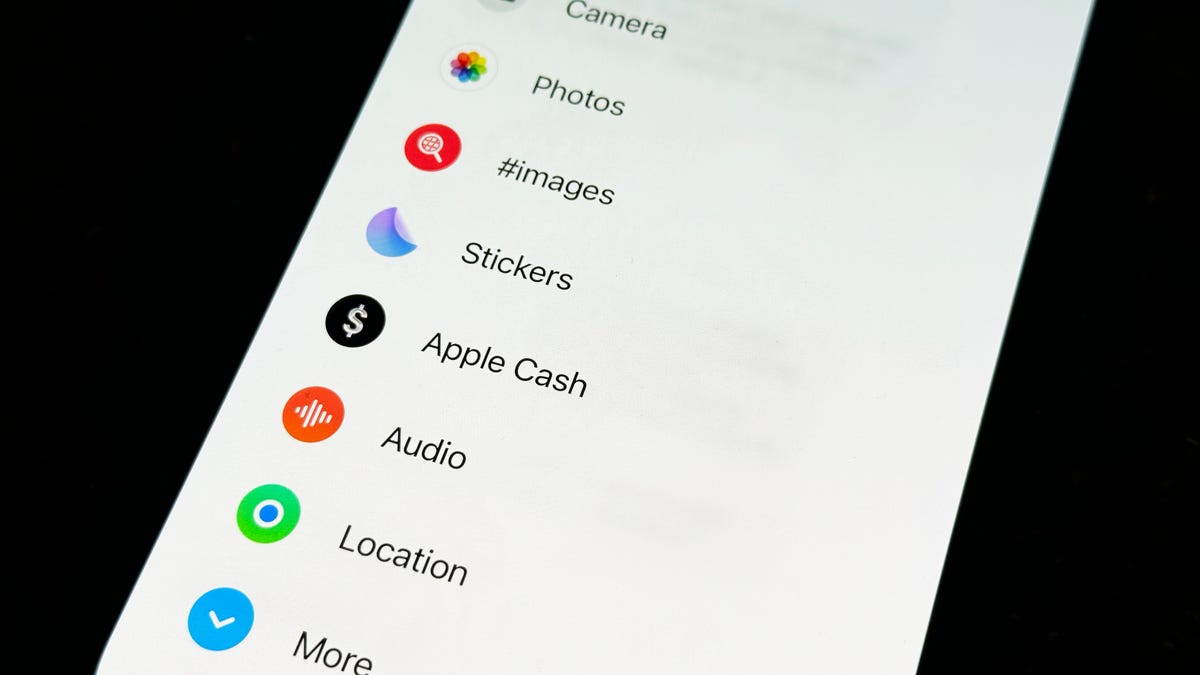
Apple made a significant change to how users access apps from within text messages in iOS 17. Previously, the apps were located above the keyboard for easy access. However, with iOS 17, Apple introduced a single button to the left of the text message field that opens a full-screen interface with all the apps. This new menu is organized differently and may not be to everyone’s liking. However, there is a hidden trick to organize the menu to prioritize important apps.

To rearrange the apps in Messages on iOS 17, users can open the Messages app, go into a text message thread, and tap the plus button on the bottom left to access the apps menu. Default Apple apps appear on the first page, while downloaded third-party apps are on the second page. Users can easily rearrange the apps by tapping and holding an app, then dragging it up or down the menu. This allows users to move any default apps from the first page to the second and vice versa.

Users have the freedom to fill the first page with as many apps as they want. While it is possible to have all apps on the first page, some users prefer to keep only a few most-used apps on the first page and the rest on the second. This organization makes it easier to find and access the desired app without having to scroll through a long list. The ability to customize app placement provides a personalized and efficient messaging experience on iOS 17.

For those interested in exploring more hidden features on iOS 17, there are additional resources available. By familiarizing themselves with these features, users can enhance their overall iPhone experience and optimize their usage of the device. Additionally, there are ways to fix annoying iOS 17 features and settings to tailor the device to individual preferences. By staying informed about the latest updates and features, iPhone users can make the most of their device and improve their overall user experience.

Overall, the changes in how apps are accessed within text messages on iOS 17 have streamlined the process and provided users with more control over app organization. The introduction of a single button to access all apps in a full-screen interface offers a new way of interacting with apps within Messages. By utilizing the hidden trick to organize apps, users can prioritize important apps and create a more personalized messaging experience. With additional resources and tips available, users can further enhance their iPhone experience and optimize their device’s features and settings.


Follow on Google News Follow on Flipboard
Share. Facebook Twitter Pinterest Email Telegram WhatsApp Copy Link

You Might Like

Dubai Spotlight: Analyzing the Evolving Audience Tastes with AI Social Listening Tools in the UAE

Darven: A New Leap in AI-Powered Legal Technology Launching from the UAE to the World

Array

Array

Array

Array

Editors Picks

مرآة التاريخ: تحليل البناء السردي للدروس الخالدة في قصص الأنبياء والإسلام

4 weeks ago

السندات الحكومية والشركات: أساسيات الاستثمار الآمن والدخل الثابت

1 month ago

UAE Ranks Among Top Rugby Markets on TOD as British & Irish Lions Tour Kicks Off

5 months ago

Darven: A New Leap in AI-Powered Legal Technology Launching from the UAE to the World

6 months ago

Jordan to Host Iraq in the Final Round of the Asian World Cup Qualifiers After Securing Historic Spot

6 months ago

Latest News

فلسطين: قلبٌ ينبض بالصمود والأمل

7 months ago

Roland Garros 2025: A New Era of Viewing, A Tribute to Legends, and Moments to Remember

7 months ago

Array

7 months ago
Advertisement
Facebook X (Twitter) TikTok Instagram Threads
© 2025 West Timelines. All Rights Reserved. Developed By: Sawah Solutions
  • Privacy Policy
  • Terms
  • Contact

Type above and press Enter to search. Press Esc to cancel.