







Close Menu
West TimelinesWest Timelines
  • News
  • Politics
  • World
    • Africa
    • Asia
    • Australia
    • Europe
      • United Kingdom
      • Germany
      • France
      • Italy
      • Russia
      • Spain
      • Turkey
      • Ukraine
    • North America
      • United States
      • Canada
    • South America
  • Business
    • Finance
    • Markets
    • Investing
    • Small Business
    • Crypto
  • Elections
  • Entertainment
  • Health
  • Lifestyle
    • Fashion
    • Food & Drink
    • Travel
    • Astrology
  • Weird News
  • Science
  • Sports
    • Soccer
  • Technology
  • Viral Trends
Trending Now

RING LAUNCHES NEW AI-POWERED SMART VIDEO SEARCH IN THE UAE

4 weeks ago

Dubai Spotlight: Analyzing the Evolving Audience Tastes with AI Social Listening Tools in the UAE

2 months ago

مرآة التاريخ: تحليل البناء السردي للدروس الخالدة في قصص الأنبياء والإسلام

2 months ago

السندات الحكومية والشركات: أساسيات الاستثمار الآمن والدخل الثابت

2 months ago

UAE Ranks Among Top Rugby Markets on TOD as British & Irish Lions Tour Kicks Off

7 months ago
Facebook X (Twitter) Instagram
West TimelinesWest Timelines
  • News
  • US
  • #Elections
  • World
    • North America
      • United States
      • Canada
    • Europe
      • United Kingdom
      • Germany
      • France
      • Italy
      • Spain
      • Ukraine
      • Russia
      • Turkey
    • Asia
    • Australia
    • Africa
    • South America
  • Politics
  • Business
    • Finance
    • Investing
    • Markets
    • Small Business
    • Crypto
  • Lifestyle
    • Astrology
    • Fashion
    • Food & Drink
    • Travel
  • Health
  • Sports
    • Soccer
  • More
    • Entertainment
    • Technology
    • Science
    • Viral Trends
    • Weird News
Subscribe
  • Israel War
  • Ukraine War
  • United Kingdom
  • Canada
  • Germany
  • France
  • Italy
  • Russia
  • Spain
  • Turkey
  • Ukraine
West TimelinesWest Timelines
Home»Technology
Technology

Unleashing Your Creativity: How iPhone Emoji in iOS 18 Will Expand Your Imagination

September 19, 2024No Comments3 Mins Read
Facebook Twitter Pinterest LinkedIn Telegram Email WhatsApp Copy Link

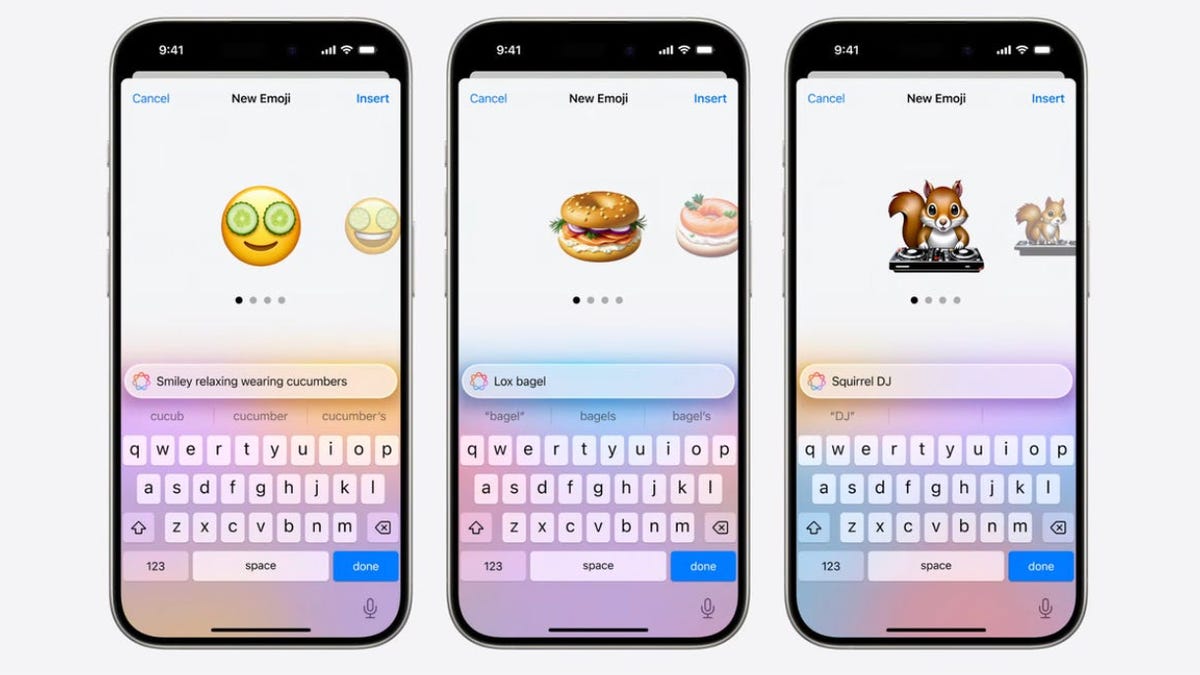
Apple Intelligence is set to bring a new feature called Genmoji to supported iPhones in the iOS 18 update, scheduled to arrive later this fall. Genmoji is an AI-powered tool that allows users to create unique emoji by typing a description or selecting an image from their Photos app. While similar to Android’s Emoji Kitchen, Genmoji offers a more customizable and personalized experience by generating multiple emoji options based on the user’s prompt. These emojis can be used as stickers, tap back reactions, and inline messages, just like regular emoji.

The implementation of Genmoji showcases Apple’s unique approach to AI, combining both productivity-enhancing features and fun, creative tools. Users can expect to see a range of emoji possibilities using Genmoji, from whimsical combinations like a dinosaur in a tutu on a surfboard to more realistic images like a bagel with lox or a person with cucumbers over their eyes. Additionally, users will be able to create Genmoji based on photos of people in their Photos app, further increasing the customization options available.

Genmoji will be accessible directly from the keyboard on supported iPhones, making it easy for users to incorporate these unique emoji into their messages and conversations. While the exact release date for Genmoji within the iOS 18 update is not yet confirmed, Apple has stated that the Apple Intelligence features, including Genmoji, will be rolled out over the course of the next year. This suggests that users can expect to see Genmoji and other AI enhancements gradually becoming available on supported devices.

In terms of device compatibility, Genmoji will be available on iPhones that support Apple Intelligence, which includes the new iPhone 16 lineup and the iPhone 15 Pro models. Other devices with the M1 processor or later, such as Macs and iPads, will also receive Apple Intelligence support, potentially expanding the reach of Genmoji beyond just iPhones. However, it remains uncertain how Genmoji will function on non-Apple devices with RCS support, and further testing will be necessary to assess compatibility.

Overall, the introduction of Genmoji as part of Apple Intelligence represents an innovative and engaging way for users to express themselves through customized emoji. With the ability to create and use these unique emoji in various messaging contexts, Genmoji adds a playful and interactive element to the iOS experience. As Apple continues to develop and enhance its AI capabilities, users can look forward to more features like Genmoji that combine functionality with creativity, offering a new dimension to how we communicate and connect through technology.


Follow on Google News Follow on Flipboard
Share. Facebook Twitter Pinterest Email Telegram WhatsApp Copy Link

You Might Like

Dubai Spotlight: Analyzing the Evolving Audience Tastes with AI Social Listening Tools in the UAE

Darven: A New Leap in AI-Powered Legal Technology Launching from the UAE to the World

Array

Array

Array

Array

Editors Picks

Dubai Spotlight: Analyzing the Evolving Audience Tastes with AI Social Listening Tools in the UAE

2 months ago

مرآة التاريخ: تحليل البناء السردي للدروس الخالدة في قصص الأنبياء والإسلام

2 months ago

السندات الحكومية والشركات: أساسيات الاستثمار الآمن والدخل الثابت

2 months ago

UAE Ranks Among Top Rugby Markets on TOD as British & Irish Lions Tour Kicks Off

7 months ago

Darven: A New Leap in AI-Powered Legal Technology Launching from the UAE to the World

7 months ago

Latest News

Jordan to Host Iraq in the Final Round of the Asian World Cup Qualifiers After Securing Historic Spot

7 months ago

فلسطين: قلبٌ ينبض بالصمود والأمل

8 months ago

Roland Garros 2025: A New Era of Viewing, A Tribute to Legends, and Moments to Remember

8 months ago
Advertisement
Facebook X (Twitter) TikTok Instagram Threads
© 2026 West Timelines. All Rights Reserved. Developed By: Sawah Solutions
  • Privacy Policy
  • Terms
  • Contact

Type above and press Enter to search. Press Esc to cancel.



