




Close Menu
West TimelinesWest Timelines
  • News
  • Politics
  • World
    • Africa
    • Asia
    • Australia
    • Europe
      • United Kingdom
      • Germany
      • France
      • Italy
      • Russia
      • Spain
      • Turkey
      • Ukraine
    • North America
      • United States
      • Canada
    • South America
  • Business
    • Finance
    • Markets
    • Investing
    • Small Business
    • Crypto
  • Elections
  • Entertainment
  • Health
  • Lifestyle
    • Fashion
    • Food & Drink
    • Travel
    • Astrology
  • Weird News
  • Science
  • Sports
    • Soccer
  • Technology
  • Viral Trends
Trending Now

Dubai Spotlight: Analyzing the Evolving Audience Tastes with AI Social Listening Tools in the UAE

4 weeks ago

مرآة التاريخ: تحليل البناء السردي للدروس الخالدة في قصص الأنبياء والإسلام

4 weeks ago

السندات الحكومية والشركات: أساسيات الاستثمار الآمن والدخل الثابت

1 month ago

UAE Ranks Among Top Rugby Markets on TOD as British & Irish Lions Tour Kicks Off

5 months ago

Darven: A New Leap in AI-Powered Legal Technology Launching from the UAE to the World

6 months ago
Facebook X (Twitter) Instagram
West TimelinesWest Timelines
  • News
  • US
  • #Elections
  • World
    • North America
      • United States
      • Canada
    • Europe
      • United Kingdom
      • Germany
      • France
      • Italy
      • Spain
      • Ukraine
      • Russia
      • Turkey
    • Asia
    • Australia
    • Africa
    • South America
  • Politics
  • Business
    • Finance
    • Investing
    • Markets
    • Small Business
    • Crypto
  • Lifestyle
    • Astrology
    • Fashion
    • Food & Drink
    • Travel
  • Health
  • Sports
    • Soccer
  • More
    • Entertainment
    • Technology
    • Science
    • Viral Trends
    • Weird News
Subscribe
  • Israel War
  • Ukraine War
  • United Kingdom
  • Canada
  • Germany
  • France
  • Italy
  • Russia
  • Spain
  • Turkey
  • Ukraine
West TimelinesWest Timelines
Home»Technology
Technology

Utilizing AirDrop for Fast Photo and File Transfers

May 17, 2024No Comments3 Mins Read
Facebook Twitter Pinterest LinkedIn Telegram Email WhatsApp Copy Link

AirDrop is a convenient way to share photos, files, and links between Apple devices. It allows for the quick and seamless transfer of various types of content, such as photos, documents, videos, and more. AirDrop works on any iOS device running iOS 7 or newer and any Mac running OS X Yosemite or newer, as long as both devices are within 30 feet of each other and have Wi-Fi and Bluetooth turned on. There is no limit to the size of the file that can be AirDropped, but larger files may take longer to transfer. AirDrop is limited to Apple devices and does not work with Android or PC.

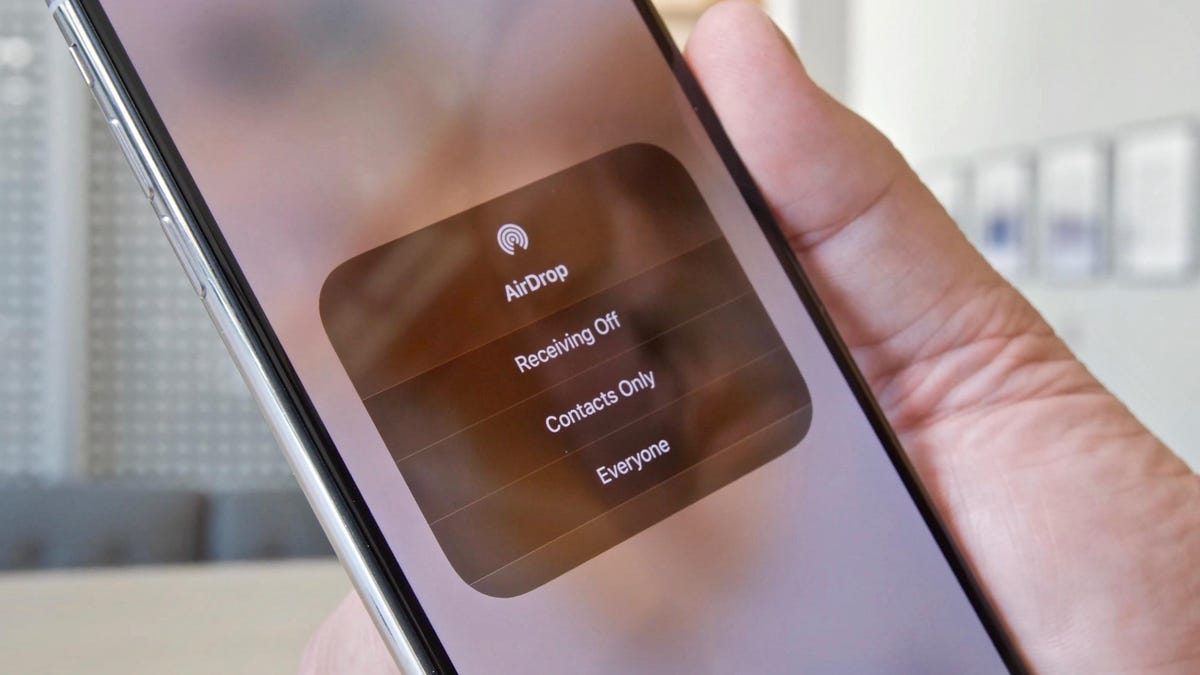
To use AirDrop on an iPhone, ensure that Wi-Fi and Bluetooth are both turned on, then access the Control Center panel, expand the wireless connection icon, and tap AirDrop to choose who can send files to your device. On a Mac, make sure Wi-Fi and Bluetooth are enabled, open a Finder window, click on AirDrop from the sidebar, and choose who can send files to your Mac. When using AirDrop on an iPhone, select the Share button on the content you want to share, choose AirDrop, select the recipient, and wait for them to accept the transfer. The recipient can choose where to save the file, and larger files may need to be downloaded using an app.

NameDrop is a new AirDrop feature introduced in iOS 17 that allows users to share contact information, photos, and videos between two iPhones by bringing them close together. This feature requires both devices to have iOS 17 or later and only works between iPhones. To use NameDrop, go to Settings > General > AirDrop and enable the Bringing Devices Together option. This feature is a fun addition to AirDrop that simplifies sharing content between iPhones. When AirDropping from an iPhone to a Mac, simply select the content, tap the AirDrop icon, choose the recipient, and wait for them to accept the transfer. The same process applies for sharing videos, documents, and other content.

To change your AirDrop name, which is the same as your device name, on an iPhone, go to Settings > General > About and tap on the current device name to change it. By mastering the art of AirDrop, users can easily share content between their Apple devices without the need for emails or USB drives. Additionally, exploring hidden features in iOS 17 can enhance the overall user experience and make the most of Apple devices. AirDrop is a convenient and efficient tool for transferring files, photos, and links between Apple devices and is a feature that can greatly benefit users within the Apple ecosystem.


Follow on Google News Follow on Flipboard
Share. Facebook Twitter Pinterest Email Telegram WhatsApp Copy Link

You Might Like

Dubai Spotlight: Analyzing the Evolving Audience Tastes with AI Social Listening Tools in the UAE

Darven: A New Leap in AI-Powered Legal Technology Launching from the UAE to the World

Array

Array

Array

Array

Editors Picks

مرآة التاريخ: تحليل البناء السردي للدروس الخالدة في قصص الأنبياء والإسلام

4 weeks ago

السندات الحكومية والشركات: أساسيات الاستثمار الآمن والدخل الثابت

1 month ago

UAE Ranks Among Top Rugby Markets on TOD as British & Irish Lions Tour Kicks Off

5 months ago

Darven: A New Leap in AI-Powered Legal Technology Launching from the UAE to the World

6 months ago

Jordan to Host Iraq in the Final Round of the Asian World Cup Qualifiers After Securing Historic Spot

6 months ago

Latest News

فلسطين: قلبٌ ينبض بالصمود والأمل

7 months ago

Roland Garros 2025: A New Era of Viewing, A Tribute to Legends, and Moments to Remember

7 months ago

Array

7 months ago
Advertisement
Facebook X (Twitter) TikTok Instagram Threads
© 2025 West Timelines. All Rights Reserved. Developed By: Sawah Solutions
  • Privacy Policy
  • Terms
  • Contact

Type above and press Enter to search. Press Esc to cancel.