



Close Menu
West TimelinesWest Timelines
  • News
  • Politics
  • World
    • Africa
    • Asia
    • Australia
    • Europe
      • United Kingdom
      • Germany
      • France
      • Italy
      • Russia
      • Spain
      • Turkey
      • Ukraine
    • North America
      • United States
      • Canada
    • South America
  • Business
    • Finance
    • Markets
    • Investing
    • Small Business
    • Crypto
  • Elections
  • Entertainment
  • Health
  • Lifestyle
    • Fashion
    • Food & Drink
    • Travel
    • Astrology
  • Weird News
  • Science
  • Sports
    • Soccer
  • Technology
  • Viral Trends
Trending Now

RING LAUNCHES NEW AI-POWERED SMART VIDEO SEARCH IN THE UAE

3 weeks ago

Dubai Spotlight: Analyzing the Evolving Audience Tastes with AI Social Listening Tools in the UAE

2 months ago

مرآة التاريخ: تحليل البناء السردي للدروس الخالدة في قصص الأنبياء والإسلام

2 months ago

السندات الحكومية والشركات: أساسيات الاستثمار الآمن والدخل الثابت

2 months ago

UAE Ranks Among Top Rugby Markets on TOD as British & Irish Lions Tour Kicks Off

7 months ago
Facebook X (Twitter) Instagram
West TimelinesWest Timelines
  • News
  • US
  • #Elections
  • World
    • North America
      • United States
      • Canada
    • Europe
      • United Kingdom
      • Germany
      • France
      • Italy
      • Spain
      • Ukraine
      • Russia
      • Turkey
    • Asia
    • Australia
    • Africa
    • South America
  • Politics
  • Business
    • Finance
    • Investing
    • Markets
    • Small Business
    • Crypto
  • Lifestyle
    • Astrology
    • Fashion
    • Food & Drink
    • Travel
  • Health
  • Sports
    • Soccer
  • More
    • Entertainment
    • Technology
    • Science
    • Viral Trends
    • Weird News
Subscribe
  • Israel War
  • Ukraine War
  • United Kingdom
  • Canada
  • Germany
  • France
  • Italy
  • Russia
  • Spain
  • Turkey
  • Ukraine
West TimelinesWest Timelines
Home»Technology
Technology

Closing Your Laptop and Utilizing an External Monitor

May 2, 2024No Comments3 Mins Read
Facebook Twitter Pinterest LinkedIn Telegram Email WhatsApp Copy Link

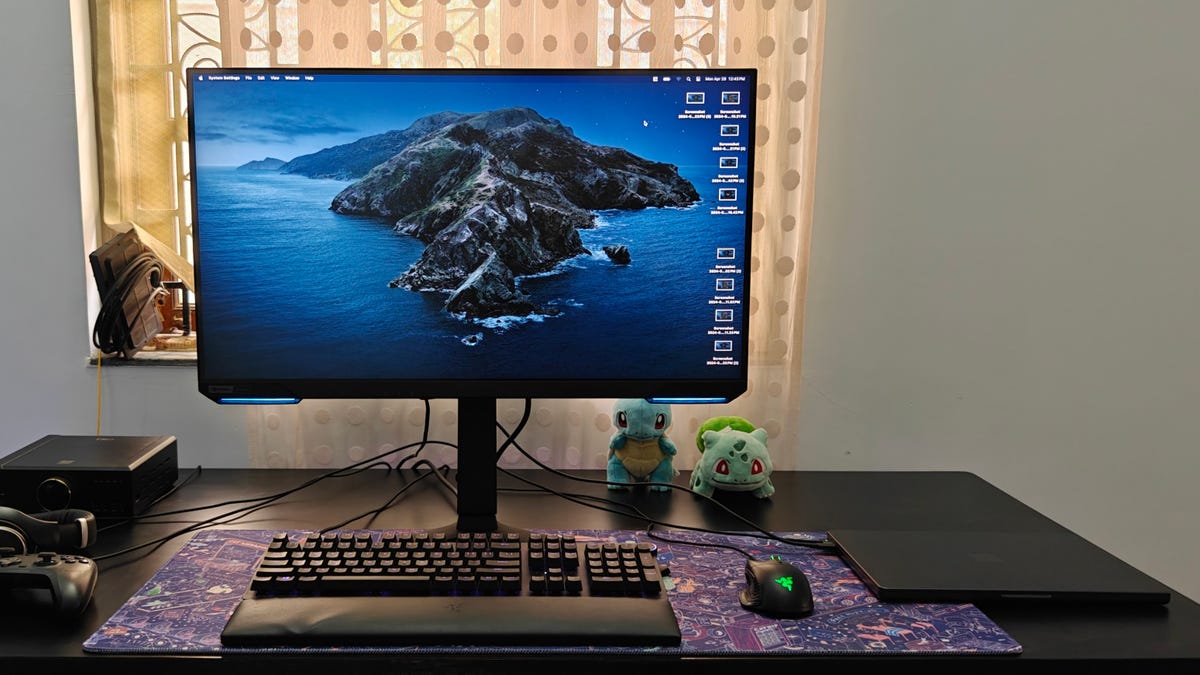
Laptops are great for on-the-go work, but if you prefer working from a desk, setting up a dock with a bigger screen, keyboard, and mouse can enhance productivity. Converting a laptop into a desktop setup is not too difficult and offers the convenience of easily switching back and forth between mobile and stationary workstations. To set up a laptop to work with a monitor, one will need the necessary peripherals and cables for a stable connection. Using a USB hub or dock can simplify the docking process and streamline the setup.

For Windows laptops, changing the system settings to allow the lid to be closed while using the monitor is essential. By adjusting the power settings in the Control Panel to prevent the laptop from entering sleep mode when the lid is closed, users can seamlessly switch to working with an external monitor. Connecting an external keyboard and mouse, as well as the monitor, is also necessary to complete the setup. Adjusting the display settings may be required to ensure the monitor’s resolution, refresh rate, and display scaling are optimal for the user’s preferences.

MacBooks behave differently when connected to an external monitor, as they do not require changes to the lid settings. However, users must connect the MacBook to a power source to prevent it from entering sleep mode when the lid is closed. Connecting external peripherals and the monitor is similar to the Windows setup, with additional adjustments that may need to be made in the MacOS display settings to ensure the monitor displays the desktop correctly. Configuring the display resolution, refresh rate, and other settings can enhance the user experience when using a MacBook with a closed lid.

Using a laptop with the lid closed at a desk can offer a more comfortable and efficient workspace, but it is important to consider factors such as proper ventilation and temperature control. Utilizing a USB hub or dock can simplify the process of connecting and disconnecting the laptop from peripherals, reducing wear and tear on ports. Some laptops may become hotter when used with the lid closed for extended periods, so monitoring temperatures and ensuring proper airflow is essential. Consider investing in ergonomic home office essentials to create a more functional and comfortable workspace.

In conclusion, converting a laptop into a desktop setup with a larger monitor can enhance productivity and comfort for users who prefer working at a desk. By following the necessary steps to adjust settings and connect peripherals, one can easily switch between using the laptop as a mobile device and a desktop workstation. Monitoring the laptop’s temperature and ensuring proper ventilation can help maintain optimal performance when using the laptop with the lid closed. Explore the best home office essentials and desks to further enhance your desk setup for maximum efficiency and comfort.


Follow on Google News Follow on Flipboard
Share. Facebook Twitter Pinterest Email Telegram WhatsApp Copy Link

You Might Like

Dubai Spotlight: Analyzing the Evolving Audience Tastes with AI Social Listening Tools in the UAE

Darven: A New Leap in AI-Powered Legal Technology Launching from the UAE to the World

Array

Array

Array

Array

Editors Picks

Dubai Spotlight: Analyzing the Evolving Audience Tastes with AI Social Listening Tools in the UAE

2 months ago

مرآة التاريخ: تحليل البناء السردي للدروس الخالدة في قصص الأنبياء والإسلام

2 months ago

السندات الحكومية والشركات: أساسيات الاستثمار الآمن والدخل الثابت

2 months ago

UAE Ranks Among Top Rugby Markets on TOD as British & Irish Lions Tour Kicks Off

7 months ago

Darven: A New Leap in AI-Powered Legal Technology Launching from the UAE to the World

7 months ago

Latest News

Jordan to Host Iraq in the Final Round of the Asian World Cup Qualifiers After Securing Historic Spot

7 months ago

فلسطين: قلبٌ ينبض بالصمود والأمل

8 months ago

Roland Garros 2025: A New Era of Viewing, A Tribute to Legends, and Moments to Remember

8 months ago
Advertisement
Facebook X (Twitter) TikTok Instagram Threads
© 2026 West Timelines. All Rights Reserved. Developed By: Sawah Solutions
  • Privacy Policy
  • Terms
  • Contact

Type above and press Enter to search. Press Esc to cancel.